Smart ordering for bars.
Less waiting. More consumption.
Turn every table into an ordering point.
The simplest way to receive orders in your bar.
Customers order from the table on their phones.
Orders go straight to the bar or kitchen.
No lines. No confusion. No complicated apps.
Digital menu, table ordering, and simple real-time management.
Start now - setup takes just a few minutes.
Ordering flow
Customer + staff
Table connection
QR or password
Visibility
Real time
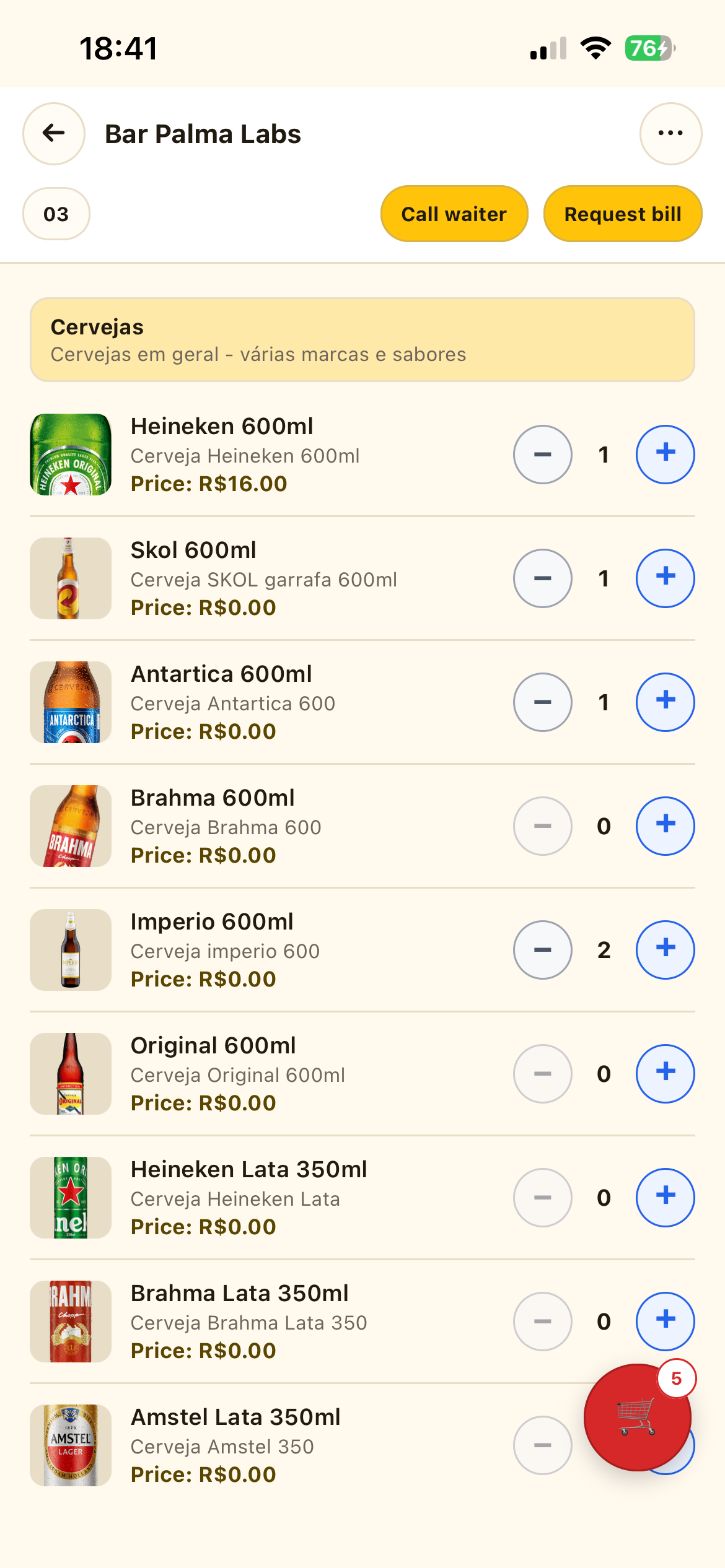
Client app
Customer connected to the table and ordering on mobile.
Operations panel
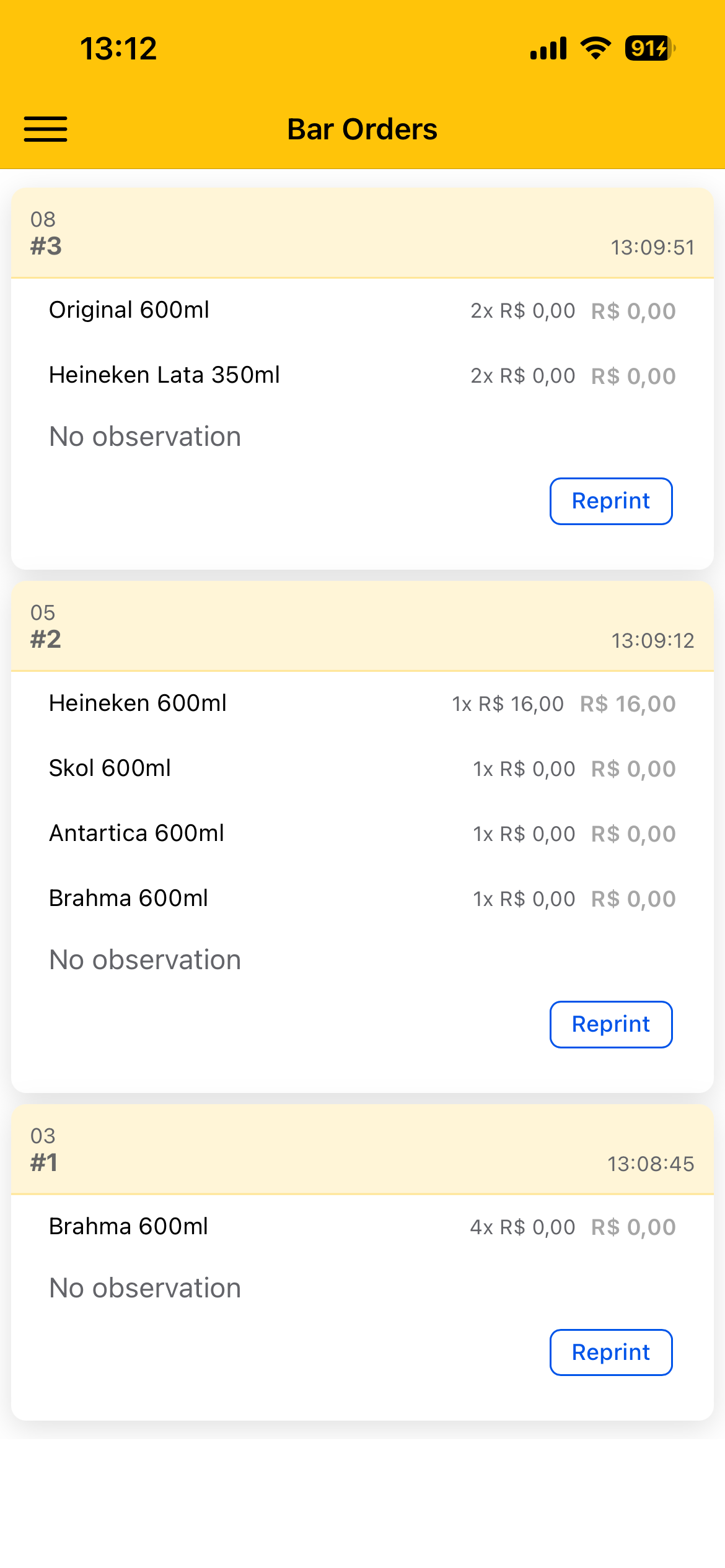
Orders arrive organized by table in a clear flow for service or kitchen prep.
Expected result
A faster path from the table to the bar or kitchen.
Partner operations
Ideal for teams that want to speed up bar orders, reduce operational friction, and improve the table experience.
Less friction in the bar. More orders moving.
Tap4Beer is designed to remove common service bottlenecks and give teams more predictability during peak hours.
Without Tap4Beer
Manually written orders create noise and rework.
Staff lose time going back and forth for simple actions.
Customers wait longer than needed to order, call staff, or request the bill.
With Tap4Beer
Digital menu directly connected to the table.
Operations panel with orders, tables, and real-time visibility.
Quick actions to call staff, request the bill, and organize the order queue.
Everything your operation needs to sell with less friction.
These features reflect the real product flow and show how Tap4Beer organizes both the table experience and bar operations.
Digital menu by table
Customers open the menu on their phones and order without waiting for staff on every round.
Connection by QR code or password
Tables can be connected through a simple flow for dynamic operations.
Customer orders
Products go straight into the operational flow with notes and a clear subtotal.
Waiter orders
Staff can also place orders in the system to keep everything centralized.
Operations dashboard
Daily orders, occupied tables, and quick visibility into the bar operation.
Table management
Set up tables, capacity, status, and the open session for each unit.
Call staff and request bill
Customers can notify the team from their phones and reduce idle service time.
Bluetooth printing
Receive, print, and reprint orders when the operation needs kitchen or bar tickets.
Menu setup
Organize categories, items, and prices in a simple operational interface.
Per-location structure
Built to operate by establishment, with a base ready for multi-tenant scenarios.
A clear flow for customers and staff.
Customers handle table orders on mobile while the team follows the operation in a simple, focused panel.
For customers
Choose the establishment
The customer selects the bar or restaurant and enters that location's experience.
Connect to the table
Name, table, and password unlock actions like ordering, calling staff, and requesting the bill.
Build the order and send
Items go into the cart, the subtotal stays clear, and the order goes straight to operations.
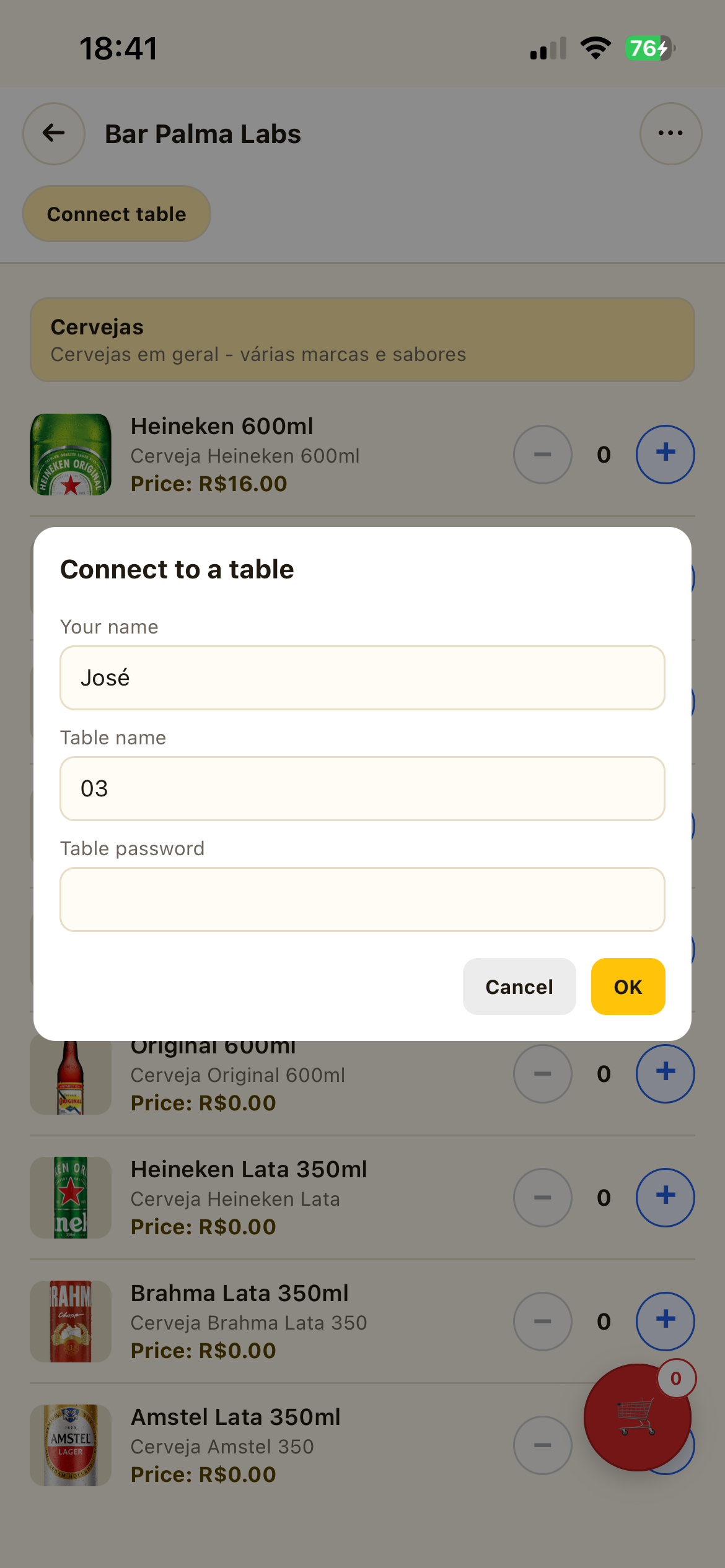
Table connection
Connecting to a table is simple and direct.
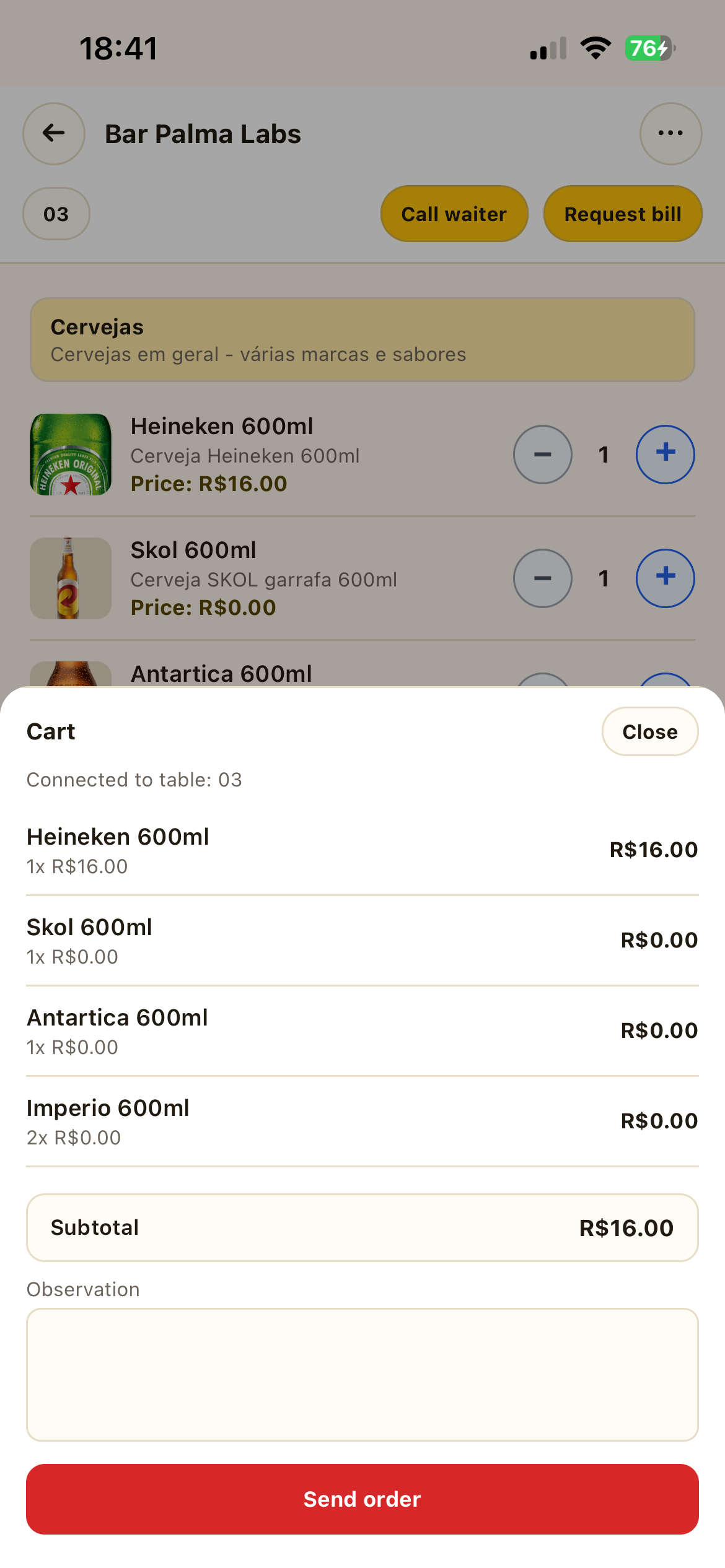
Mobile ordering
Order sent with visible subtotal and notes.
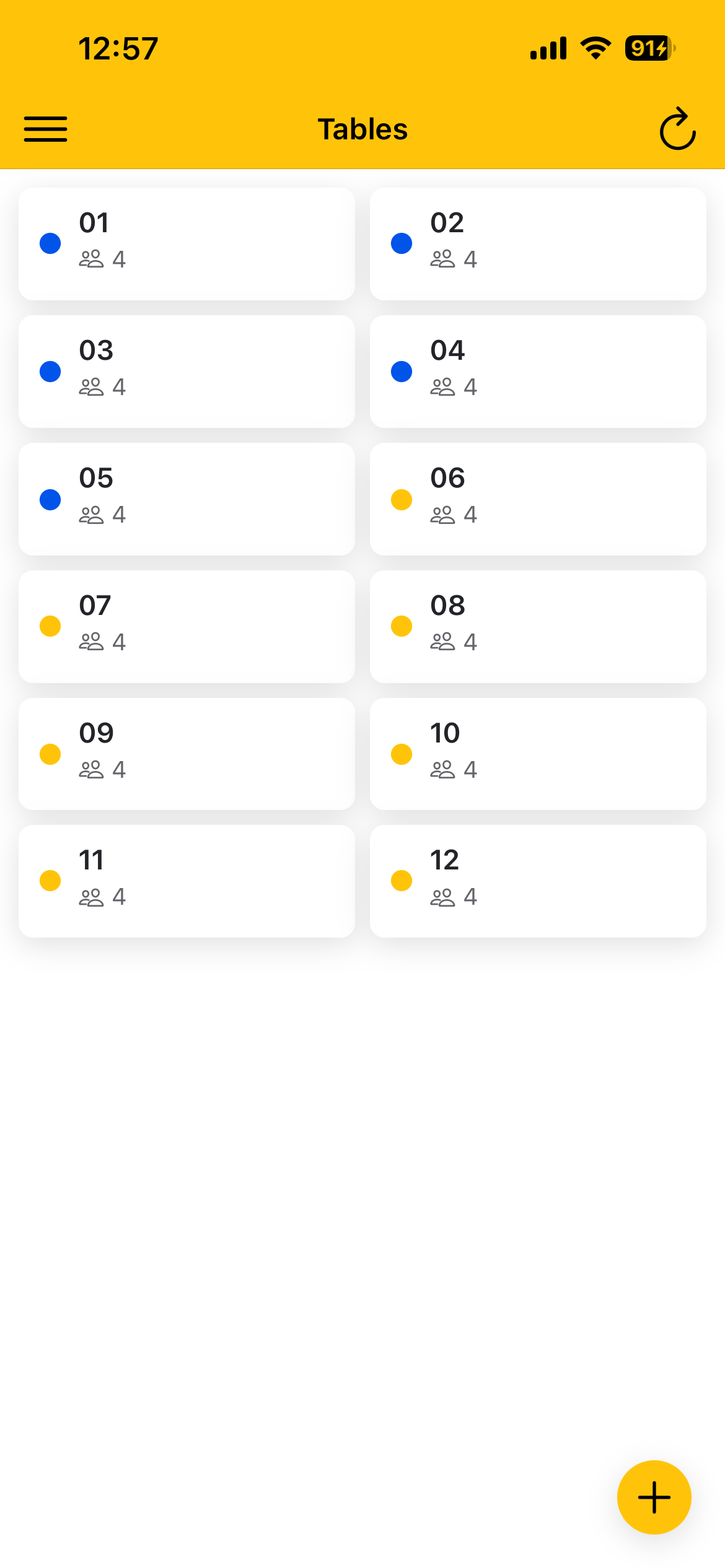
Table management
Tables, status, and capacity organized in a quick view.
Operational orders
Orders arrive organized by table for the bar or kitchen with more predictability.
For staff
Organize tables and menu
Register items, prices, categories, and tables so the venue is ready to operate.
Follow the operation
See occupancy, recent orders, and open tables in a practical operations view.
Receive and process orders
Orders arrive organized by table and can move to printing and service.
From download to first order in a few steps.
Set up the Bar app, prepare the operation, and validate the flow before opening it to customers.
Download the Bar app
Install Beerbar, the app your team uses to set up menus, tables, orders, QR Codes, and printing.
Create an account or log in
Sign up or use an existing account to access the establishment's operations panel.
Build the menu
Add categories, products, descriptions, prices, and photos. You can also use the AI assistant for an initial draft.
Register tables
Create tables one by one or in batches, with name, capacity, color, and password for manual connection.
Configure printing, if needed
Select the Bluetooth printer in settings and run a print test before service starts.
Open tables and generate QR Codes
Open the table session, enter the number of guests, and show the QR Code so customers can connect.
Send waiter orders
Use Waiter Orders to select items, attach them to an open table, and send them to the same operational flow.
Track and test the flow
View orders and calls in Bar Orders, test the customer QR flow, and close the table when finished.
Tap4Beer fits operations where service needs to flow.
Tap4Beer adapts to table-based operations, recurring orders, and teams that need to start quickly.
Bars
Speed up rounds, reduce hidden queues, and keep service moving during peak hours.
Restaurants
Organize table service with less noise between front of house, cashier, and kitchen.
Events
A fast flow for recurring orders in temporary or high-traffic operations.
Food trucks
Use the digital menu to reduce lines and help customers decide faster.
Start free and move at your pace
At launch, you can test with a limited free version and continue with a simple promotional offer.
Limited
Free
A free version to test and validate the operation before subscribing.
Product registration
Menu organization
Table registration
Table ordering
Up to 10 orders per day
Promotional
R$ 5/7 days
Keep using Tap4Beer after the trial with a simple launch offer.
Continue after testing
Launch promotional condition
Simple weekly subscription
Quick activation to keep operating
Coming soon
New options
Future weekly and monthly plans with more flexibility, still being defined.
Full plans coming soon
Weekly and monthly options
More flexibility for different operations
The gain appears when ordering is simple and operations are visible.
No magic promises. Tap4Beer is built to unlock operational speed and reduce points of failure in the bar.
Faster service
Orders leave the table and go straight to operations without loose notes or repeated information.
Fewer errors and less rework
Items, quantities, and notes are recorded more clearly throughout the flow.
More sales opportunities
When ordering is easier, customers tend to repeat the action with less friction.
Better table turnover
Actions like calling staff and requesting the bill get faster, freeing the team to serve better.
Common questions before getting started.
Frequent questions to help you start faster and understand the self-service flow.
Final CTA
If your bar wants to start now, Tap4Beer can already go into operation.
Download the Bar app, configure your menu, and prepare your operation to receive orders straight from the table.
Your main entry point is self-service. Contact is available for support.
Download the Bar app and start at your own pace. If you need help, use the form or WhatsApp as a support channel.
Start with the Bar app
Set up menu, tables, and the initial operation in a few minutes. If questions come up, contact remains available.
 Talk on WhatsApp
Understand how to set up menu, tables, and the initial operation.
Use contact as support without depending on it to start.
Start at your own pace and ask specific questions when needed.